
A fan community domain works best when visitors can quickly understand who belongs there and what they can do. ShowUp.fans offers a useful live-music example. Its address connects an action-oriented name with a fan audience, while the homepage explains a sequence from local interest to a possible show. For creators and community organizers, the case raises a practical question about choosing an address that fits a clear purpose.
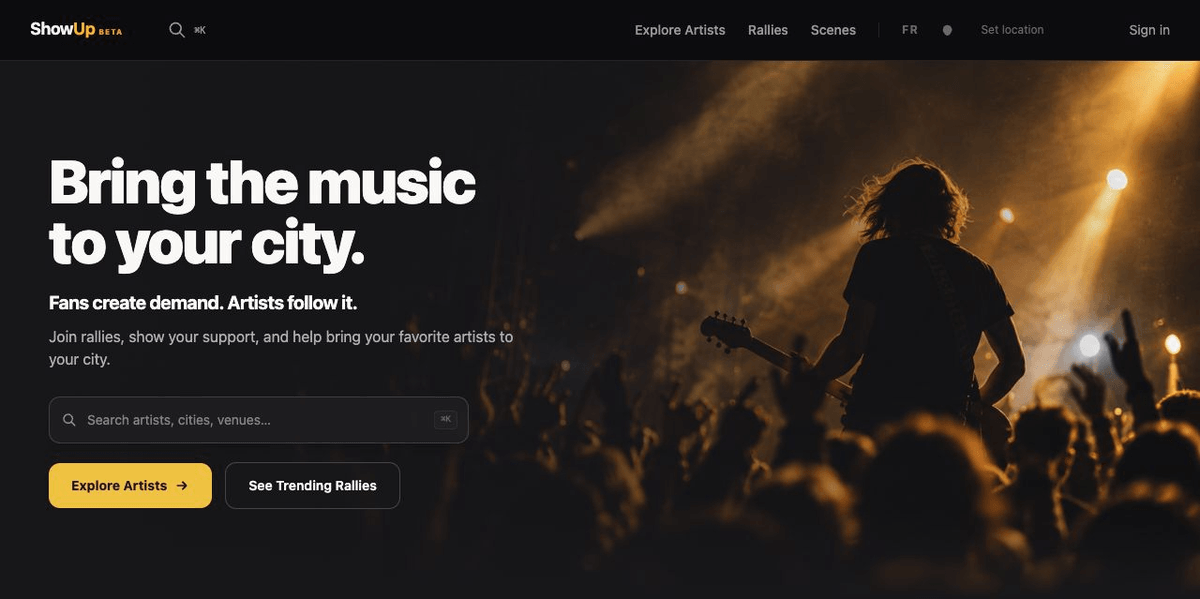
Screenshot from ShowUp.fans, November 17, 2026.
What ShowUp.fans puts behind its name
The English homepage introduces a service where visitors can explore artists, local scenes, and fan rallies. Its explanation separates joining a rally, considering a show campaign, and receiving a ticket if funding and confirmation conditions are met. The page explicitly labels its demonstration cards as simulated examples. Those observations describe the public interface inspected on November 16, 2026. They do not establish attendance or campaign results.
The naming lesson is visible before any detailed product discussion. ShowUp is a short phrase associated with participation. The .fans ending identifies the people invited to participate. Together, the address can be read as a destination for an audience with a shared interest. The site still has to explain the action, its conditions, and the next step once the visitor arrives.
For your own project, begin with that relationship between name and purpose. Write one sentence describing who should visit and what they should find. Then read the full proposed address beside the sentence. If the name needs a long explanation, consider whether the homepage can resolve the ambiguity in a few clear words.
A fan community domain should fit a repeatable task
A project name can be memorable while leaving its purpose unclear. ShowUp's public navigation gives the visitor several concrete routes associated with live music. The case suggests a useful planning exercise for your own site. Choose the task that deserves the most prominent place, then organize supporting pages around it.
For a local music community, that task might be finding a gathering, following a project, or reading a current update. A creator hub might prioritize a release or an upcoming appearance. The specific task should come from the content you can actually maintain. A fan community domain gives the project an address, while the page structure gives a visitor a reason to return.
Test the idea with a simple page outline. Put the primary action near the top and give secondary actions descriptive labels. Ask someone unfamiliar with the project to explain what they expect after each click. Their answer can reveal whether the domain name, headline, and navigation are telling a consistent story.
Make participation stages easy to recognize
Community projects often involve several levels of participation. Reading information, expressing interest, joining an account, and making a commitment each deserve clear wording. ShowUp's staged explanation provides a concrete example of a website distinguishing those moments. The general design lesson is to describe each action at the point where the visitor encounters it.

When planning a fan community domain, write the button labels alongside the page copy. If a button leads to a sign-up form, say what the sign-up is for. If a page introduces a proposal, label it as a proposal. The visitor should be able to understand the current stage without interpreting an internal project vocabulary.
Apply the same care to confirmation messages. Explain what the visitor has completed and where to find the next relevant information. For a small community, a clear confirmation page can be easier to maintain than several overlapping messages. Review the wording whenever the process changes so that the site continues to describe the real experience.
Keep demonstrations separate from project outcomes
The ShowUp homepage's simulated cards matter to this case because examples can look persuasive at a glance. A sample event, progress bar, or ticket illustration can help explain an interface. Clear labels allow the reader to understand its teaching purpose. A case study should preserve that distinction when discussing the page.
If you build a fan community domain before your project has a long history, you can still explain the planned experience honestly. Use a labeled example or a simple diagram. Describe the steps a visitor would take and identify which parts are available. Avoid presenting a demonstration as proof that people have already participated.
For your own content review, keep a small evidence record. Note the source of any event date, result, testimonial, or photograph you want to publish. Record whether it is current information, a historical example, or an illustration. This makes future updates easier and helps anyone editing the site preserve the intended meaning.
Connect the address with a focused homepage
A fan community domain should remain understandable when it appears away from the website. It might be printed on a flyer, spoken during a stream, or placed in a profile. Read the full address aloud and consider how someone would type it after hearing it once. Check that the project name is legible at the sizes where you plan to use it.
The homepage then needs to confirm the visitor's expectation. Use a direct headline, a short description of the audience, and a clear route into the content. Keep the most important information visible on a phone. A site may have many supporting pages, but its first screen should give a newcomer enough context to choose a next step.
For inspiration across different audiences, review the registry's real .fans use cases . Treat each example as a way to think about audience and purpose. Your own choice should fit the project you can explain and maintain, with a name and page structure that work together.
Plan an address you can keep using
Before registering a fan community domain, consider how the project may develop. A name tied to one date or venue can become restrictive if the community later changes its activities. A broader identity may suit a continuing project, provided the homepage clearly states its current focus. Write down the likely content categories before choosing between those approaches.
Think about who will manage the address and the website. Keep the account ownership, renewal contact, and site responsibilities clear within the team. If several volunteers contribute, decide who can update the homepage and who reviews changes to the main links. These practical arrangements help keep the destination consistent over time.
The address is one part of that operating plan. Hosting, content tools, community features, and third-party services have their own setup and terms. List the functions your project needs before comparing providers. A clear list makes it easier to ask informed questions without assuming that every service is included with domain registration.
Check the route from discovery to return
Use a small walkthrough to review the finished site. Start from the place where a new visitor is most likely to see the address. Open it on a phone, read the first screen, and follow the primary link. Then return to the homepage and find a second useful page. This tests whether the site supports a coherent journey.

For a fan community domain, a returning visitor may have a different question from a newcomer. They may want the latest update, a familiar resource, or the next event. Give those recurring needs a stable place in the navigation. Keep time-sensitive information dated so visitors can judge whether it still applies.
Record what you learn from the walkthrough as specific changes. A vague comment such as confusing is harder to act on than a note that the main button leads to an unexplained form. Review the changed page again after saving it. This small editorial habit can help a team maintain a useful site as its content grows.
Consider a hypothetical neighborhood music group preparing its first website. Its initial audience may know the organizers personally, while a newcomer arrives from a shared poster. The newcomer needs the group’s purpose, the location relevant to the project, and a clear explanation of the next activity. Existing members may need a quick route to updates. Sketching both visits helps the team decide which information belongs on the homepage and which deserves a separate page.
The group can then review the same outline before it chooses a name. If the planned site serves several local activities, a single-event name may leave the later pages feeling disconnected. If the project is deliberately temporary, a campaign-specific name may fit its purpose. This is a planning example rather than an account of ShowUp’s internal decisions. The useful exercise is to make the relationship between the name, audience, and intended content explicit.
Finally, assign an owner to the information that changes most often. One person might check event details, another maintain the introduction, and another review the main links. Keep the review simple enough that it happens. A clear domain and a carefully written launch page are easier to sustain when the team already knows how it will keep the destination accurate.
Questions about choosing a fan community domain
What does the ShowUp.fans example demonstrate?
It demonstrates a public website using a short action-oriented name with the .fans extension and explaining several stages of participation. The observations support a discussion of naming, navigation, and clear labels. They provide no measured evidence that the domain caused more visitors, ticket sales, engagement, or successful events.
Does a .fans registration include community features?
Domain registration provides an address under the registrar's terms. The website and any community features require their own services and setup. Define the functions you need, such as publishing updates or offering member access, then check the relevant providers. The registry's registration page helps you find registrars for the domain itself.
How should a team choose its name?
Start with the intended audience and the purpose of the site, then compare names that remain clear when read as a full address. Check spelling, pronunciation, and fit with the project. Review availability and terms with a registrar. Keep the name connected to the content and responsibilities your team can sustain.
Can a domain choice guarantee audience growth?
A domain can express identity and provide a destination, while audience growth depends on many factors beyond the address. Useful content, communication, and the visitor experience all require ongoing work. Evaluate the name for clarity and suitability rather than treating registration as a promise of search visibility or commercial results.
Where can I check a .fans address?
Use the registry's registrar directory to find a provider and check the proposed name there. Availability, registration terms, and renewal conditions should be reviewed with that registrar. Prepare a few suitable names and consider the website services you will need separately so the full project setup is clear.
ShowUp.fans illustrates how a name can connect participation with a recognizable audience. For your own fan community domain, define the visitor's task, build a clear first page, and choose an address that fits the project. When you are ready to check options, use the .fans registration directory to find a registrar.